
Most business websites in Los Angeles have the same problem: they look decent but they don’t work.
Visitors land, browse for a few seconds, and leave. The phone doesn’t ring. The contact form gathers dust. The business owner assumes traffic is the issue and keeps spending more on ads — when the real problem is the website itself.
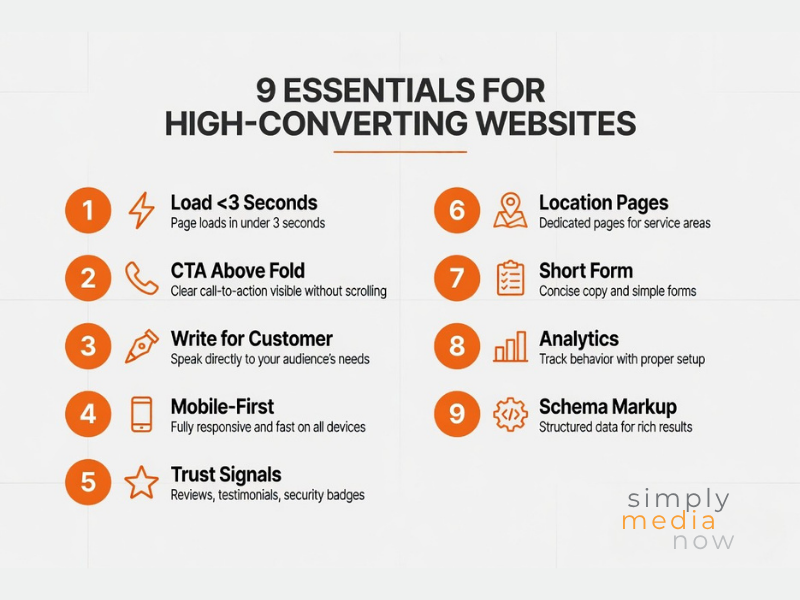
A great website isn’t just a digital brochure. It’s your best salesperson — working 24/7, never calling in sick, always ready to turn a visitor into a lead. In this guide, we’ll walk you through the nine conversion essentials every Los Angeles business website needs in 2026.
Load in Under 3 Seconds (Or Lose Half Your Visitors)
Google data shows that 53% of mobile visitors abandon a website that takes longer than 3 seconds to load. In Los Angeles — where mobile search dominates — this directly translates to lost business every single day.
Why LA websites are often slow:
- Shared hosting plans (common on GoDaddy) lack the server resources for fast load times
- Unoptimised images — original photos uploaded at 5MB+ slow everything down
- Too many plugins on WordPress installations
- No caching system in place
- Unused CSS and JavaScript files loading on every page
How to fix it:
- Test your current speed at PageSpeed Insights (pagespeed.web.dev) — target 80+ on mobile
- Compress all images to under 200KB using a tool like ShortPixel or Smush
- Install a caching plugin (W3 Total Cache or WP Rocket for WordPress)
- Consider upgrading to managed WordPress hosting if you’re on basic shared hosting
💡 Our website design clients on GoDaddy frequently have mobile scores below 40. After our technical optimisation work, most reach 70–85. The impact on both rankings and conversion is immediate.
Make Your Primary CTA Impossible to Miss
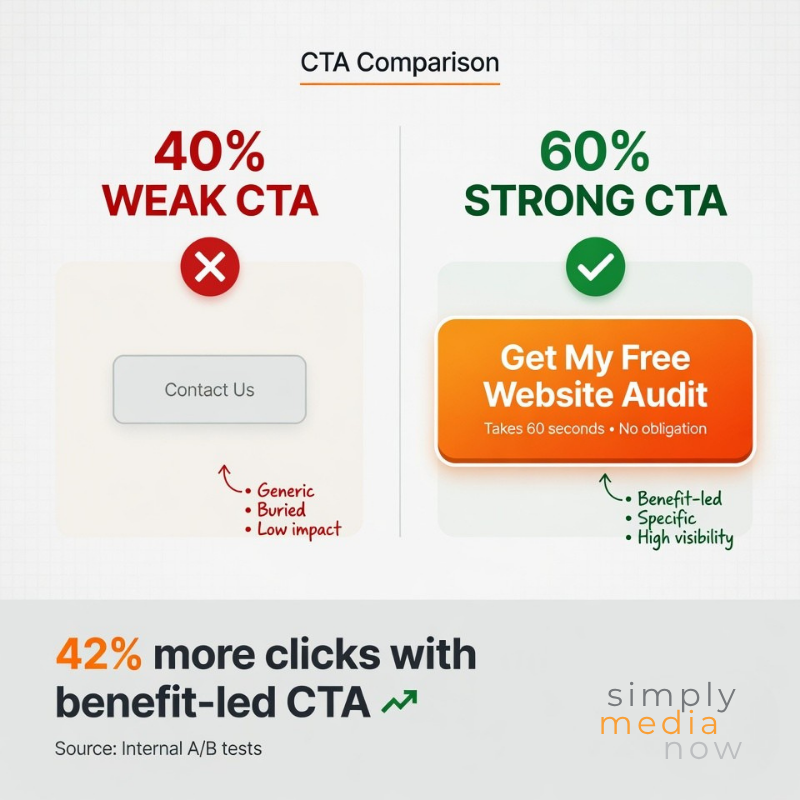
Your Call to Action (CTA) is the most important element on your page. It’s the instruction you give visitors about what to do next — ‘Book a Free Consultation’, ‘Get a Quote’, ‘Call Now’, ‘Schedule an Appointment’.
Most LA business websites bury the CTA at the bottom of the page after paragraphs of text. By then, 80% of visitors have already left.
CTA best practices for 2026:
- Place your primary CTA above the fold — visible without scrolling on every device
- Use a contrasting colour that stands out from the rest of your design (orange and green perform well against blue/navy backgrounds)
- Use action-oriented, specific language: ‘Book Free Consultation’ outperforms ‘Contact Us’ by an average of 42%
- Repeat the CTA at the end of every page section and in your navigation bar
- Include a phone number as a tap-to-call link on mobile — many users prefer calling over filling out a form
Write for Your Customer — Not for Yourself
The most common website mistake we see: business owners write about themselves instead of writing about their customers.
Weak homepage copy (what most businesses write):
“We are a premier full-service digital marketing company with over 10 years of experience providing cutting-edge solutions to businesses across the greater Los Angeles metropolitan area.”
Strong homepage copy (what converts):
“Los Angeles businesses grow faster when they show up on page 1. We get you there — and keep you there.”
The conversion-focused writing framework:
- Lead with the problem you solve, not your credentials
- Use ‘you’ and ‘your’ more than ‘we’ and ‘our’
- Be specific about your service area (Beverly Hills, Santa Monica, Marina Del Rey, Culver City)
- State your unique value proposition in one sentence
- Use social proof (client results, review counts, years in business) to support claims — don’t just make them
Mobile-First Design Is Non-Negotiable
In 2026, over 62% of web traffic in Los Angeles comes from mobile devices. If your website isn’t designed for mobile first, you’re delivering a poor experience to the majority of your visitors.
Mobile design essentials:
- Text minimum 16px body, 22px+ for headings — readable without zooming
- Buttons minimum 44x44px touch target — easy to tap with a thumb
- No horizontal scrolling — content must fit within the viewport
- Forms with as few fields as possible — every extra field reduces completion rate by 10–15%
- Click-to-call phone number prominently displayed in the header
- Images that scale correctly at all screen sizes
Test your website right now: pull it up on your own phone. If you find yourself pinching to zoom, scrolling sideways, or struggling to tap buttons, you’re losing customers every day.
Build Trust Before You Ask for Anything
A website visitor in Los Angeles has hundreds of options. Before they fill out your contact form or call you, they need to trust you. Trust signals are the elements that say ‘we are a legitimate, credible business.’
Essential trust signals for LA business websites:
- Google reviews widget: Display your live rating and review count prominently. Businesses with 4.8+ stars and 30+ reviews convert dramatically better than those with 8 reviews.
- Testimonials with real names, photos, and results: ‘John M., Beverly Hills – 3 new clients in the first 60 days’ is far more credible than an anonymous quote.
- Specific results, not vague claims: ‘127% increase in GBP calls in 90 days’ beats ‘We get results.’
- Local signals: Your address, a photo of your office or team, local phone number, proximity to recognisable LA landmarks.
- Logos of clients served, certifications, or media mentions
- Real team photos — not stock photography
Create Service Area and Location Pages
If you serve multiple cities in the LA area, a single ‘About Us‘ or ‘Services’ page is leaving ranking opportunities on the table.
Create dedicated pages for each of your key service areas:
- /local-seo-beverly-hills/
- /website-design-santa-monica/
- /digital-marketing-culver-city/
- /marketing-agency-marina-del-rey/
Each page should be 1,000–1,500+ words, reference local landmarks and businesses, include a local testimonial if possible, and target city-specific keywords in the H1, meta title, and throughout the content.
This is one of the highest-leverage on-page SEO actions for any LA service business. Each location page is an additional entry point into your website from a different city’s search traffic.
Optimise Your Contact Form for Conversions
Most contact forms ask for too much information upfront. Name, email, phone, company, website, message, how did you hear about us, preferred contact method, budget range — by the time a prospect finishes reading the form, they’ve decided to call a competitor instead.
Conversion-optimised form principles:
- 3–4 fields maximum for initial contact: Name, phone, email, and one qualifying question
- Set expectations: ‘We respond within 2 business hours’ reduces anxiety and increases submission rate
- Use clear button copy: ‘Get My Free Audit’ performs better than ‘Submit’
- Add a privacy note below the form: ‘We never share your information’
- Make the form visible without scrolling on mobile — or use a sticky ‘Book Now’ button that floats on screen
Track Everything with Analytics
You cannot improve what you don’t measure. Every LA business website should have Google Analytics 4 and Google Search Console installed and verified.
Key metrics to review monthly:
- Organic sessions (how many visitors came from search)
- Bounce rate by page (which pages are losing visitors)
- Conversion rate (what percentage of visitors contact you)
- Top landing pages (which pages attract the most traffic)
- Device breakdown (mobile vs desktop traffic ratio)
- Geographic data (which cities your visitors are coming from)
Google Tag Manager allows you to track specific actions — form submissions, click-to-call taps, scroll depth — without touching your website code. If you don’t have these set up, you’re flying blind on the most important business decisions.
Schema Markup: The Hidden Ranking Signal Most LA Sites Miss
Schema markup (also called structured data) is code you add to your website that tells Google exactly what your business is, where you are, what you do, your hours, and your reviews.
Without it, Google has to interpret your website and make educated guesses. With it, Google knows exactly — and rewards you with better rankings and rich results (star ratings shown directly in search results).
Essential schema for LA service business websites:
- LocalBusiness schema: NAP (name, address, phone), geo-coordinates, hours, service area
- Organization schema: Logo, contact info, social profiles
- Service schema: Description of each service you offer
- FAQ schema: Allows your FAQ answers to appear directly in Google search results
- Review schema: Displays your star rating alongside your search listing
💡 Schema is implemented as JSON-LD code in your website’s <head> tag. We include it in all our website design projects and add it retroactively for clients who already have an existing site.
Frequently Asked Questions
How much does a business website cost in Los Angeles?
A professional, conversion-optimised LA business website typically costs $3,000–$8,000 for design and build, depending on the number of pages, custom functionality, and e-commerce requirements. Template-based builds on platforms like Elementor or Divi are at the lower end; fully custom designs are at the higher end. Ongoing maintenance and hosting typically runs $100–$300/month.
Should I use WordPress or another platform?
For most LA small businesses, WordPress with Elementor is the optimal combination — it’s flexible, widely supported, SEO-friendly, and doesn’t lock you into a proprietary platform. Squarespace and Wix are good for very simple sites but limit SEO capability and customisation. Shopify is the best choice for e-commerce.
How long does a website redesign take?
A typical 5–10 page business website redesign takes 4–8 weeks from kickoff to launch, assuming timely feedback and content delivery from the client. More complex sites with custom integrations, membership areas, or large content libraries take longer.
My website already looks good. Why isn’t it generating leads?
Aesthetics and conversion are different things. A beautiful website that loads slowly, buries its CTA, and doesn’t rank on Google will generate zero leads. Our recommendation: run a PageSpeed test, check your GBP call volume, verify your analytics are set up, and audit your highest-traffic pages for CTA clarity. We offer free website reviews for LA businesses.
What’s the difference between a website redesign and a website refresh?
A redesign rebuilds the site from scratch — new structure, new design system, new code. A refresh updates the visual design, content, and specific pages without rebuilding the technical foundation. For sites that are under 3 years old and technically sound, a refresh is often sufficient and considerably less expensive.
─────────────────────────────────────────────────────────────
About Simply Media Now
Simply Media Now is a full-service digital marketing agency based in Marina Del Rey, California. We specialize in local SEO, website design, paid advertising, social media management, and reputation management for small and medium-sized businesses across Los Angeles. From Beverly Hills to Santa Monica to Culver City, we help LA businesses get found online, generate leads, and grow revenue.