
Google Business Profile Optimization: The Complete 2026 Guide
Your Google Business Profile is the most powerful free marketing tool you have. When optimized correctly, it puts your business in front of customers at the exact moment they’re searching for what you offer.
But here’s the problem: most businesses treat their GBP like an afterthought. They claim it, fill in the basics, and never touch it again. Meanwhile, their competitors are actively optimizing their profiles and stealing their customers.
In this guide, I’ll show you exactly how to optimize your Google Business Profile to rank higher, get more clicks, and convert more customers. This is the same process we use at Simply Media Now to help our clients dominate local search results.
What Is Google Business Profile (And Why It Matters)
Google Business Profile—formerly known as Google My Business—is your business’s free listing on Google. It’s what appears when someone searches for your business name or finds you in local search results.
Your GBP shows up in three critical places:
Google Maps: When someone searches for a business category in a specific area, Google shows a map with local results. Your GBP determines whether you appear and where you rank.
The Local 3-Pack: This is the gold mine. When someone searches “marketing agency Marina Del Rey,” Google shows three local businesses at the top of the results, above all the regular organic listings. Getting into this 3-pack means massive visibility and traffic.
The Knowledge Panel: When someone searches your business name directly, your GBP appears in a large panel on the right side of the results (or at the top on mobile). This panel includes your hours, reviews, photos, and a direct link to call or visit your website.
Here’s why this matters: 86% of consumers use Google Maps to look up a business’s location. 76% of people who search for something nearby visit a business within 24 hours. Your GBP is often the first and last thing a potential customer sees before deciding whether to call you.
The Anatomy of a Perfectly Optimized GBP
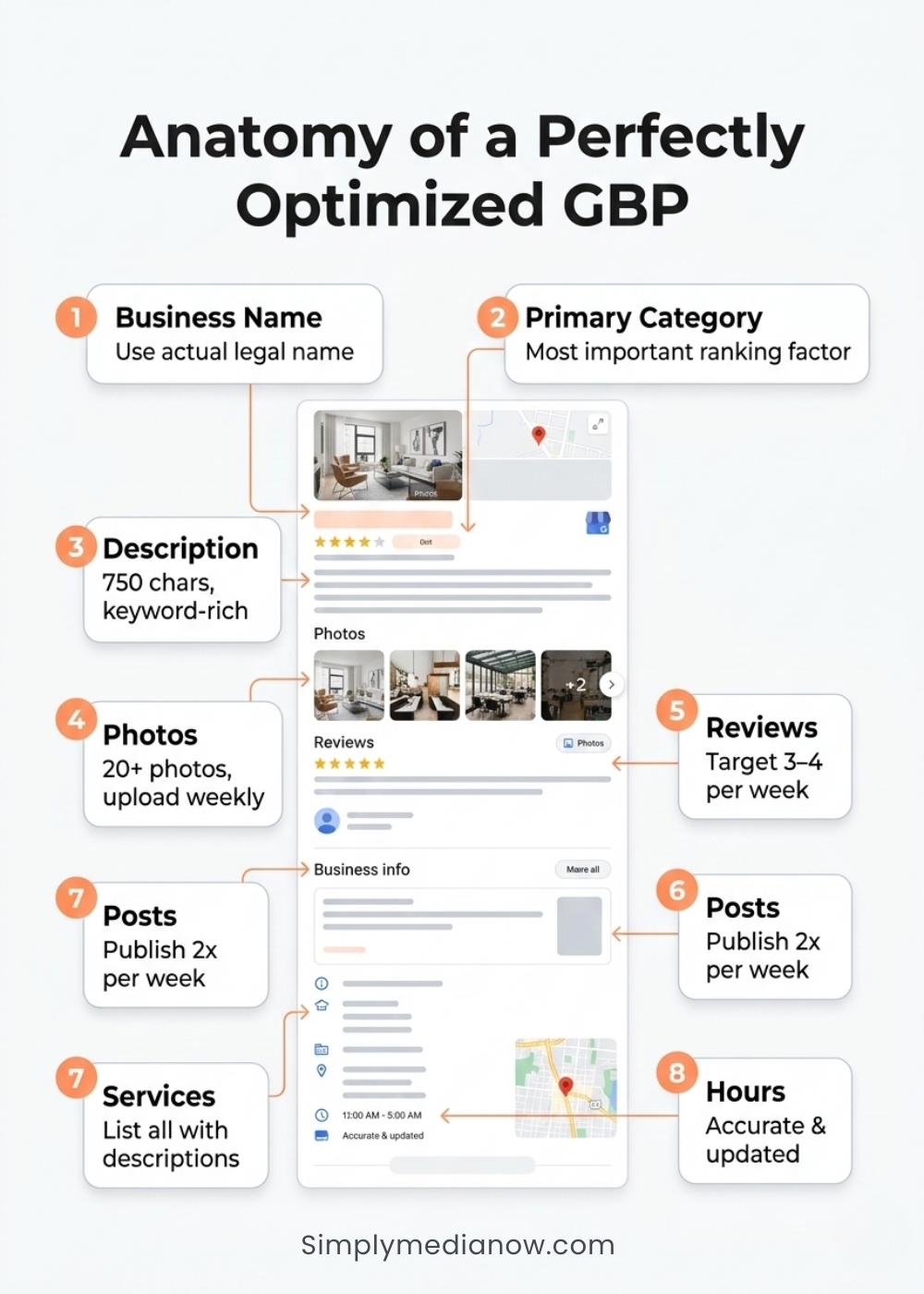
Let’s break down every element of your Google Business Profile and how to optimize each one.
Business Name
This seems simple, but many businesses get it wrong.
Use your legal business name. Nothing more. “Simply Media Now” is correct. “Simply Media Now | Local SEO Marina Del Rey” will get you suspended.
Google’s guidelines are explicit: use your real-world business name. No keywords, no location modifiers, no taglines. Violations can result in suspension, which means you disappear from local search results entirely.
The only exception is if your registered business name actually includes keywords. “Joe’s Plumbing” is fine if that’s your legal name. “Joe’s Plumbing and Drain Cleaning” is fine if that’s on your business license. But adding keywords just for SEO is against the rules.
Primary Category
Your primary category is the single most important ranking factor you directly control.
Google uses your primary category to determine which searches to show you for. If you’re a marketing agency and you select “Consultant” as your primary category, you won’t rank for “marketing agency” searches no matter how well you optimize everything else.
Choose the most specific category that describes your core business. For Simply Media Now, we use “Marketing Agency” not “Marketing Consultant” or “Internet Marketing Service.” The more specific, the better.
You can only have one primary category. Choose it carefully. Look at what your direct competitors use. Check which category the top-ranking businesses in your area use for your target keyword.
Secondary Categories
After your primary category, you can add additional categories to appear for related searches.
We use “Internet Marketing Service,” “Website Designer,” and “Advertising Agency” as secondary categories. This lets us compete for website design searches and advertising agency searches while maintaining “Marketing Agency” as our primary focus.
Add 3-4 secondary categories maximum. More isn’t always better. Each category slightly dilutes your relevance for your primary category. Focus on categories that represent services you actually provide and want to attract customers for.
Business Description
You have 750 characters to tell Google and customers what you do. Use them wisely.
Front-load your most important keywords and location. Our description starts: “Simply Media Now is a digital marketing agency in Marina Del Rey, Los Angeles, specializing in local SEO, Google Business Profile optimization, and website design for law firms, contractors, and service businesses.”
In the first sentence, we’ve mentioned our location, our three main services, and our target industries. Google reads this and immediately understands what searches to show us for.
Include your unique value proposition. Why should someone choose you? “Family-owned and operated since 2018” or “Serving over 500 Los Angeles businesses” or “Certified Google Partner.”
Mention all your service areas. “We serve Marina Del Rey, Santa Monica, Venice, Culver City, Beverly Hills, West Hollywood, and all of Los Angeles County.”
End with a call to action. “Call us today at (XXX) XXX-XXXX for a free consultation.”
Write naturally. This description appears to potential customers, so it needs to be readable and compelling, not keyword soup.
Services
The Services section lets you list specific offerings with descriptions.
We list:
- Local SEO Services
- Google Business Profile Optimization
- Google Maps Optimization
- Website Design
- Website Development
For each service, write a 150-200 word description. Include the service name, what’s included, benefits, and a call to action. These descriptions are indexed by Google and can appear in search results.
Example: “Local SEO Services: Our local SEO services help Los Angeles businesses rank higher in local search results and Google Maps. We optimize your Google Business Profile, build citations, create local content, and implement review generation systems to help you dominate your local market. Perfect for businesses in Marina Del Rey, Beverly Hills, and the Westside looking to attract more local customers. Packages start at [price]. Contact us for a free audit.”
Photos
Visual content is critical. Businesses with photos get 42% more requests for directions and 35% more clicks to their websites compared to businesses without photos.
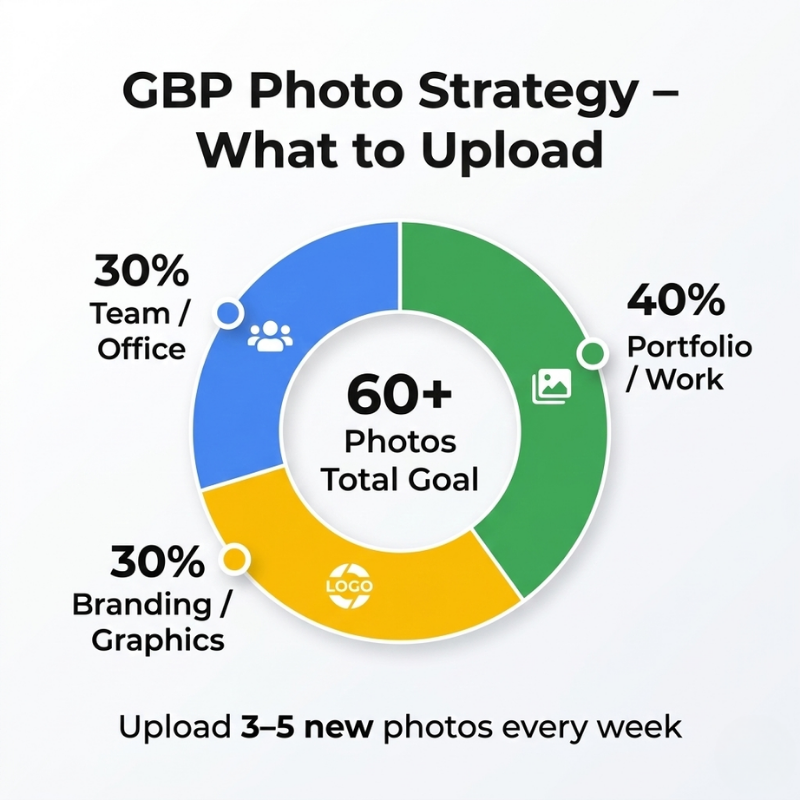
Upload at least 20 photos initially, then add 3-5 new photos every week. Here’s the breakdown:
Team and office photos (30% of uploads): Headshots of you and your team, photos of your office or workspace, behind-the-scenes shots of your business. These build trust and show you’re a real business with real people.
Portfolio and work examples (40%): Screenshots of websites you’ve built, before/after examples, client work samples, testimonials. Show the results you deliver.
Branding and graphics (30%): Your logo on a branded background, service offering graphics, infographics about your process, promotional graphics.
Photo optimization tips:
- Minimum size: 720×720 pixels (larger is better)
- Use descriptive file names: “marina-del-rey-marketing-agency.jpg” not “IMG_1234.jpg”
- Add captions to every photo with keywords and location: “Simply Media Now office in Marina Del Rey”
- Geo-tag photos to your business location before uploading (use a tool like GeoImgr)
Avoid stock photos. Google can identify stock photography and may deprioritize your profile. Use real photos of your actual business.
Posts
Google Posts are free content that appears directly in your GBP listing. They’re also indexed by Google and can rank in search results.
Post twice per week minimum. We post every Tuesday and Friday:
Tuesday: Educational content. “How to Choose the Right Marketing Agency in Los Angeles” or “5 Signs Your Website Needs a Redesign.” These establish expertise and provide value.
Friday: Promotional content. “Free Local SEO Audit This Month” or “New Client Spotlight: How We Helped a Beverly Hills Law Firm 3x Their Leads.”
Post format:
- 250-300 words
- Include your target keywords naturally
- Mention your city or service area
- Add a relevant photo
- Include a CTA button (Learn More, Call Now, Book, Sign Up)
- Link to your website
Post types:
- What’s New: General updates
- Event: Promote webinars, workshops, open houses
- Offer: Special promotions with start and end dates
- Product: Showcase specific services
Posts expire after 7 days, so you need to keep creating fresh content. This might seem like a lot of work, but it’s free advertising space with no character limits. Use it.
Reviews
Review Generation System
Reviews are the #1 local ranking factor according to every study conducted in the past five years. More reviews, higher ratings, and more recent reviews all correlate with higher rankings.
Your review strategy should have three components:
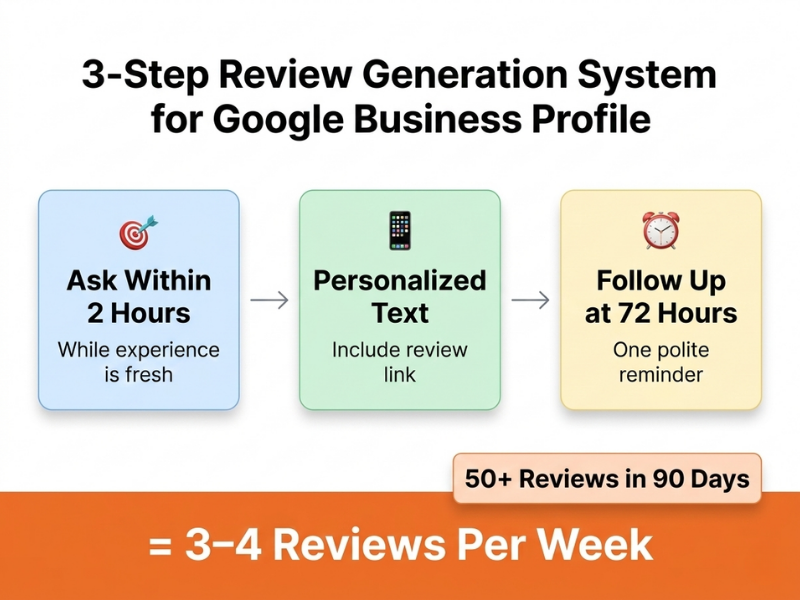
Component 1: Systematic review requests. Every customer should receive a review request. Set up a process: After project completion → personalized email or text with review link → follow up in 72 hours if no review → stop after two attempts.
Component 2: Response to all reviews. Respond to every single review within 24 hours. Thank 5-star reviews. Address concerns in negative reviews professionally. Your response appears publicly and shows future customers how you treat people.
Component 3: Volume and velocity. One review per month isn’t enough to compete. Target 3-4 reviews per week if you’re in a competitive market. At that rate, you’ll have 50 reviews in 90 days while your competitors have 15.
Review response template for 5-star reviews: “Thank you so much, [Name]! We’re thrilled you’re happy with your [service provided]. It’s always a pleasure working with businesses in [their city]. If you ever need [related service], we’re here to help! — Roxanne at Simply Media Now”
This response:
- Thanks them personally
- References the service (reinforces keywords)
- Mentions their city (local signal)
- Includes your business name
- Offers future help
Review response template for negative reviews: “Hi [Name], I’m sorry to hear about your experience. This isn’t the level of service we strive for. I’d like to make this right. Please call me directly at [phone] so we can discuss. — Roxanne, Owner, Simply Media Now”
This response:
- Acknowledges the issue
- Apologizes (even if you disagree)
- Takes it offline to resolve
- Shows you’re responsive
Never argue with a negative review publicly. Stay professional. Future customers are watching how you handle problems.
Q&A Section
The Questions & Answers section is underutilized by most businesses. It’s searchable content that appears in your GBP.
Pre-seed your Q&A with 10-15 common questions. Post questions from a personal Google account, then answer from your business account.
Sample questions:
- “What areas of Los Angeles do you serve?”
- “Do you offer free consultations?”
- “How long does a typical project take?”
- “What makes Simply Media Now different from other agencies?”
- “Do you work with small businesses or only large companies?”
Answer each question in 100-150 words. Include keywords and location. These answers can rank in Google search results for long-tail queries.
Example: Q: “What areas of Los Angeles do you serve?” A: “We serve all of Los Angeles County with a focus on the Westside. Our primary service areas include Marina Del Rey, Santa Monica, Venice, Culver City, Beverly Hills, West Hollywood, Playa Vista, El Segundo, and surrounding areas. We also work with clients throughout California and nationwide for services like website design and Google Business Profile optimization. We’re located in Marina Del Rey and love working with local businesses who want to dominate their local market. Call us at (XXX) XXX-XXXX to discuss your project!”
Attributes
Attributes are checkboxes that describe your business features. They appear as tags on your GBP.
Common attributes include:
- Online appointments
- On-site services
- LGBTQ+ friendly
- Women-led
- Veteran-led
- Wheelchair accessible
Select all attributes that accurately apply to your business. These help customers filter search results and can influence which businesses appear for certain queries.
Hours and Special Hours
Accurate hours build trust and help customers know when to contact you.
Set your regular business hours. Be honest. If you’re a consultant who works by appointment only, say so. Don’t list 24/7 hours unless you truly offer 24/7 service.
Use special hours for holidays. Update your hours for Thanksgiving, Christmas, New Year’s, etc. Customers notice when your hours are inaccurate, and it damages trust.
Mark if you’re temporarily closed due to weather, renovations, or other issues. Google will display this prominently so customers don’t waste a trip.
Advanced GBP Optimization Tactics
Once you’ve covered the basics, these advanced tactics can give you an edge:
Tactic 1: The Review Diversity Strategy
Most businesses get generic reviews: “Great service!” “Highly recommend!” These are nice but don’t help your SEO.
Train customers to mention specific things in their reviews by asking specific questions: “We’d love to know: What part of your new website are you most excited about?”
The response might be: “The new website Simply Media Now built for our Marina Del Rey law firm looks incredible. The contact form integrations work perfectly and we’ve already gotten three new leads in the first week!”
This review mentions your service (website design), your location (Marina Del Rey), your industry (law firm), and results (three leads). It’s worth ten generic reviews for SEO purposes.
Tactic 2: The GBP Post Recycling System
Posts expire after 7 days, but the content doesn’t have to be original every time. Create 20 evergreen posts about your services, process, results, and tips. Cycle through them, updating dates and minor details.
You can republish “How to Choose a Marketing Agency in Los Angeles” every 4-6 weeks with slight modifications. This maintains posting frequency without requiring constant new content creation.
Tactic 3: The Photo Caption Hack
Every photo you upload has a caption field. Most businesses skip this. That’s a mistake.
Write a descriptive caption for every photo using keywords and location: “Simply Media Now team meeting in our Marina Del Rey office discussing local SEO strategies for a Beverly Hills client.”
These captions are indexed by Google and can appear in Google Images search results.
Tactic 4: The Competitor Comparison Audit
Study the GBPs of the three businesses ranking above you. What are they doing that you’re not?
- More reviews?
- More photos?
- More consistent posting?
- Better category selection?
- More detailed service descriptions?
Create a checklist of gaps and systematically close them.
Tracking Your GBP Performance
Google provides built-in analytics called “Insights” in your GBP dashboard.
Key metrics to track monthly:
Search impressions: How many times your business appeared in search results. You want this trending up 10-20% month over month.
Profile views: How many people viewed your full GBP. This measures interest.
Website clicks: How many people clicked through to your website from your GBP.
Phone calls: Direct calls from your GBP listing.
Direction requests: People getting directions to your business.
Photo views: How many times your photos were viewed.
Compare month-over-month growth. If impressions are up but clicks are flat, your profile isn’t compelling enough—improve your photos, description, and reviews. If clicks are up but calls are flat, your website might be the problem.
Common GBP Mistakes to Avoid
Mistake 1: Buying fake reviews. Google can detect patterns of fake reviews and will penalize or suspend your listing. It’s not worth the risk. Build reviews organically.
Mistake 2: Using a keyword-stuffed business name. This violates Google’s guidelines and can get you suspended. Use your real business name only.
Mistake 3: Selecting the wrong primary category. You can change it, but you’ll lose ranking for the old category. Research carefully before choosing.
Mistake 4: Ignoring negative reviews. Respond professionally within 24 hours. Non-response makes you look unresponsive to all future customers.
Mistake 5: Inconsistent NAP (Name, Address, Phone). Your GBP, website, and citations must have identical business info. Inconsistencies confuse Google and hurt rankings.
Mistake 6: Setting and forgetting. GBP optimization is ongoing. Upload photos weekly, post twice per week, collect reviews consistently. The businesses that maintain momentum win.
Your GBP Optimization Checklist
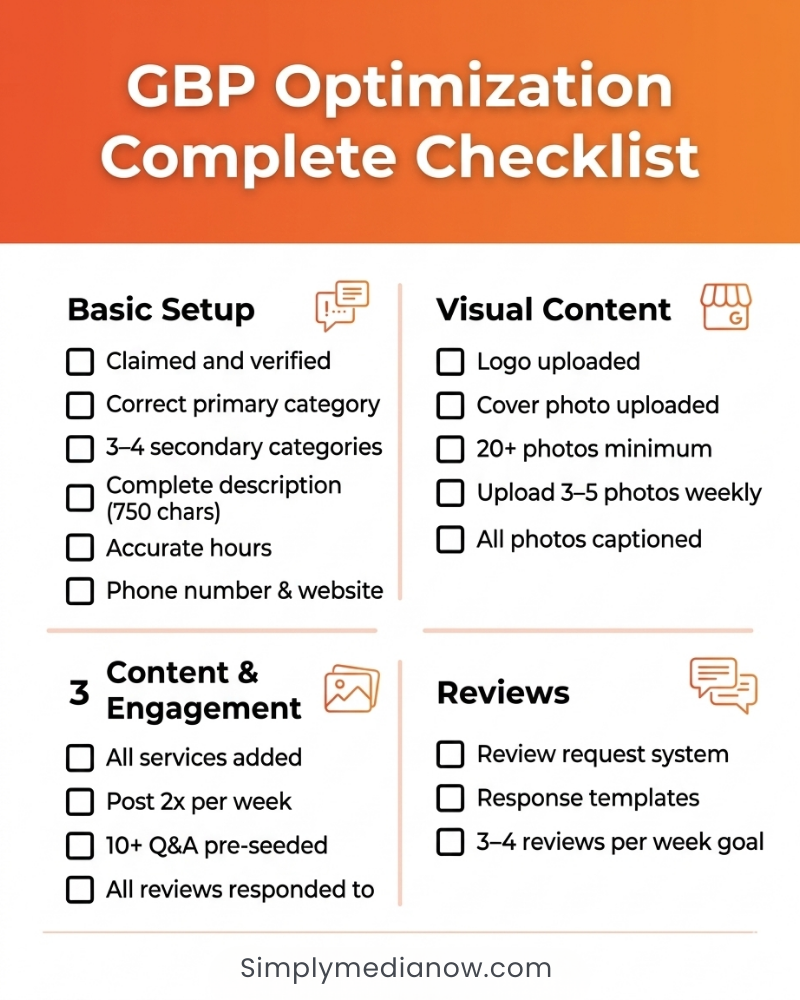
Here’s a checklist to ensure your Google Business Profile is fully optimized:
Basic Setup: ☐ Claimed and verified ☐ Correct primary category ☐ 3-4 relevant secondary categories
☐ Complete business description (750 characters) ☐ Accurate hours including special hours ☐ Phone number and website URL ☐ All relevant attributes selected
Visual Content: ☐ Logo uploaded ☐ Cover photo uploaded ☐ 20+ photos minimum ☐ Photo upload schedule (3-5 per week) ☐ Every photo has descriptive caption
Content & Engagement: ☐ All services added with descriptions ☐ Posting schedule (2x per week minimum) ☐ 10+ Q&A pre-seeded ☐ All reviews responded to
Reviews & Reputation: ☐ Review request system in place ☐ Review response template created ☐ Review count goal set (3-4 per week) ☐ Review monitoring system (get alerts for new reviews)
Advanced: ☐ Geo-tagged photos ☐ LocalBusiness schema on website ☐ Citation consistency verified ☐ Monthly performance tracking set up
Next Steps: Getting Professional Help
GBP optimization isn’t complicated, but it requires weekly consistency. Most businesses struggle with consistency because they’re busy running their business.
That’s where an agency like Simply Media Now can help. We handle the weekly posting, review generation, photo uploads, and monitoring so you can focus on serving customers.
If you’re a Los Angeles business looking to dominate local search, we’d love to help. We’ve optimized GBPs for law firms, contractors, medical practices, and service businesses across Marina Del Rey, Beverly Hills, Santa Monica, and the Westside.
Ready to get more calls from Google? Contact Simply Media Now for a free GBP audit. We’ll analyze your profile, identify quick wins, and show you exactly what to fix.
📞 (877) 277-2313 📧 https://simplymedianow.com/contact/ 📍 Marina Del Rey, CA